Inkling
(Current scale is below 100% - zoom in to view full detail)
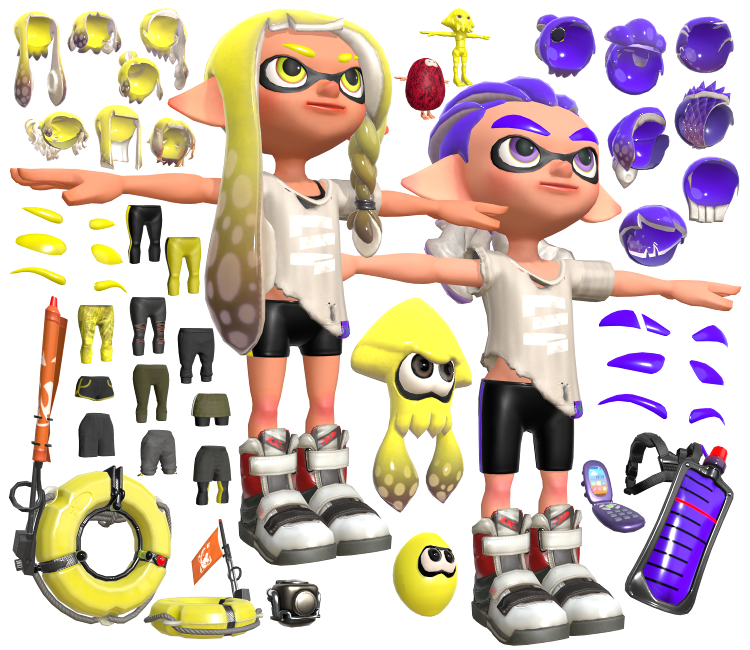
| Asset Info favorite | |
|---|---|
| Name | Inkling |
| Category | Nintendo Switch |
| Game | Splatoon 3 |
| Section | Playable Characters |
| Submitted | October 11, 2022 |
| Uploaded By | Centrixe the Dodo |
| Size |
40.70 MB (749 items) arrow_right
|
| Format |
ZIP (application/zip) dae, fbx, png |
| Hits | 69,129 |
| Tags (2): | |
Comments (95)
You must be logged in to post comments.
heres my .blend file https://drive.google.com/drive/folders/17p2D1cGABYAV5YUkDINobIJ5ksmcuJJ_
Could you send your .Blend file or material set up?

i tried it but it didnt work https://imgur.com/a/JTHJaIf
Try turning the blend mode to opaque.
https://media.discordapp.net/attachments/738880785804951632/1057897329279107102/image.png
https://media.discordapp.net/attachments/738880785804951632/1057897329279107102/image.png
the textures for the arms are messed up for me
image:https://imgur.com/a/FLYe42O
image:https://imgur.com/a/FLYe42O

how do i setup the eyes and the eyelids?
@Demi_Tree Could you give a screenshot with your textures expanded so I know which ones are non-color and sRGB?
This is my take on splatoon 3 hair nodes: https://imgur.com/gallery/lIgUIXx
This one has pseudo iradescence like in splatoon 3, where the enemy color only shows up on the dots when normals face the viewer (uses the fresnel node and a color ramp bc I do NOT want to learn about normals, but tbh it's just as good as smart people nodes anyway)
This one has pseudo iradescence like in splatoon 3, where the enemy color only shows up on the dots when normals face the viewer (uses the fresnel node and a color ramp bc I do NOT want to learn about normals, but tbh it's just as good as smart people nodes anyway)
The number labeling system can be confusing, so here is a directory:
|| hair: 0=hippie(splat1 female), 1=haircut(splat2 bob), 2=double bun, 3=wave, 4=pigtail, 5=banger, 6=topknot(splat1 male), 7=slick, 8=buzz-cut, 9=hipster(sideswept), 10=spiky-haired, 11=mush-cut(bowl cut), 12=megalobraid, 13=bed head(splat3 dried), 14=soaked(the one nobody uses in splat3), 15=cornrows
|| eyebrows: 0=classic, 1=slit, 2=thick, 3=thin
|| leg-wear: 0=classic, 1=leggings, 2=sport shorts, 3=capri sweatpants, 4=skirt w black shorts, 5=loose denim shorts, 6=drawstring cargo pants, 7=loose shorts w leggings, 8=baggy sweatpants(and the reeboks with the straps lol)
|| anything else is distinguishable from the image thumbnail
|| hair: 0=hippie(splat1 female), 1=haircut(splat2 bob), 2=double bun, 3=wave, 4=pigtail, 5=banger, 6=topknot(splat1 male), 7=slick, 8=buzz-cut, 9=hipster(sideswept), 10=spiky-haired, 11=mush-cut(bowl cut), 12=megalobraid, 13=bed head(splat3 dried), 14=soaked(the one nobody uses in splat3), 15=cornrows
|| eyebrows: 0=classic, 1=slit, 2=thick, 3=thin
|| leg-wear: 0=classic, 1=leggings, 2=sport shorts, 3=capri sweatpants, 4=skirt w black shorts, 5=loose denim shorts, 6=drawstring cargo pants, 7=loose shorts w leggings, 8=baggy sweatpants(and the reeboks with the straps lol)
|| anything else is distinguishable from the image thumbnail
It imports at .025 scale for whatever reason. Just select the armature and set the scale to 1.
why is the model so small in blender?
@CDS1012: We don't allow .blend files in model rips.

you should include the .blend files for the previews
Anyone know how to use all these interesting textures with unity? Poiyomi shader doesn't exactly have the same options as blender
Multiply the skin texture with the desired skin color. To do this, add a MixRGB node, set it to Multiply, set the FAC to 1.0, then put the skin texture as Color1 and the desired skin color as Color2.
Does anyone know how to apply the skin colors to the models?
@JBGamer in the folder named player02
...
werent there supposed to be a MALE Inkling Body?
werent there supposed to be a MALE Inkling Body?
anybody have the hex code for the ink color of the inkling used in promotional material? (the yellow inkling girl)
I sent you more detailed explanations in a PM.