Inkling
(Current scale is below 100% - zoom in to view full detail)
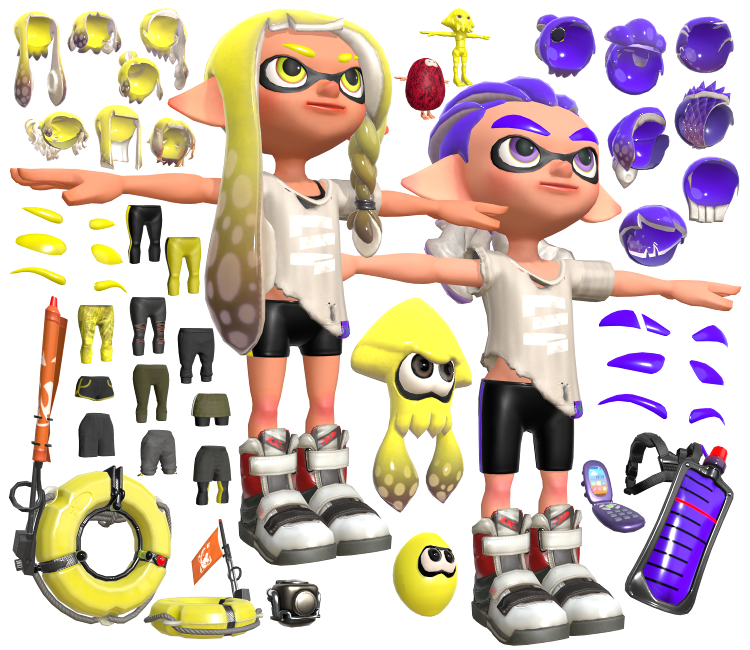
| Asset Info favorite | |
|---|---|
| Name | Inkling |
| Category | Nintendo Switch |
| Game | Splatoon 3 |
| Section | Playable Characters |
| Submitted | October 11, 2022 |
| Uploaded By | Centrixe the Dodo |
| Size |
40.70 MB (749 items) arrow_right
|
| Format |
ZIP (application/zip) dae, fbx, png |
| Hits | 69,128 |
| Tags (2): | |
Comments (95)
You must be logged in to post comments.

Does anyone know how to place eyelids on the model?
Does anyone know how to make the eyes look in directions besides the default?
@Jasper7438 Thanks, this fixed! I didn't do anything different that I can think of but whatever.

@Spletz47 Refer to to this video I made for another user with the same problem: https://drive.google.com/file/d/1W6J3YAdAr-OCOh4bTAFXQ12t1TR72kQ1/view

@CrumbsInBed I do the armature deform thing and this is what happens every time. https://drive.google.com/file/d/1kZhD9Ig2nkJjuQqT_IDbAugwykyT6k_z/view?usp=sharing
Hi it anybody wants, I made a glowing ear texture if anybody want it https://media.discordapp.net/attachments/959656448965619712/1078351345335148605/1D9B7DE9-3619-4164-858B-6A45178E3DD0.png
@Spletz47 For the eyes, you can move the UV. Select the eyes, go to UV Editing, Edit Mode, select everything and move it to where you want the eyes to point.
As for the pants, are you moving the mesh or the armature? I would suggest moving the armature any time you want to move it. If that's not the issue, maybe check the Object Constraint Properties tab on the right? something in there might be causing that.
As for the pants, are you moving the mesh or the armature? I would suggest moving the armature any time you want to move it. If that's not the issue, maybe check the Object Constraint Properties tab on the right? something in there might be causing that.
Aaaallsooo how would you move the eyes
How come when I move the pants (with cursor selection and all that) the middle of it gets stretched really weirdly? (I'm using btm_005_M)
never mind I fixed most of it lol. It's always the last and most simple thing you check
and what about the eyelids ?
I fixed it by hiding some textures but my skin is still pale. Also the skin on the face looks very non-reflective but I can't seem to get that to change either
My inkling looks like it has a beard lmao. The skin is also really pale for some reason. Anyone got any ideas? I've tried everything I can think of
thanks
To attach the hair, you have constrain the hair's root bone to inkling's head bone using a "Copy Transforms" bone constraint. Make sure that the root bone and head bone are facing the same direction.
This method works for hats as well.
Remember, use a bone constraint, not an object constraint.
This method works for hats as well.
Remember, use a bone constraint, not an object constraint.
and what about attach the hair because if i did already i try to root the head but the hair dosen't follow it... how i can do to fix ?
The clipping is inevitable. What the game does to prevent clipping is turn parts of the player's body transparent using the gear alpha masks.
I have created a tutorial on how to use gear alpha masks here: https://www.vg-resource.com/thread-41342.html
The gear alpha masks for the pants start with "btm".
I have created a tutorial on how to use gear alpha masks here: https://www.vg-resource.com/thread-41342.html
The gear alpha masks for the pants start with "btm".
Can anyone help me out with the pants? No matter how I move or pose them I just can't get them on the octoling without a little bit of skin clipping through.
Can someone post the eyelids material setup? I really need help please
thank you jasper7438