Inkling
(Current scale is below 100% - zoom in to view full detail)
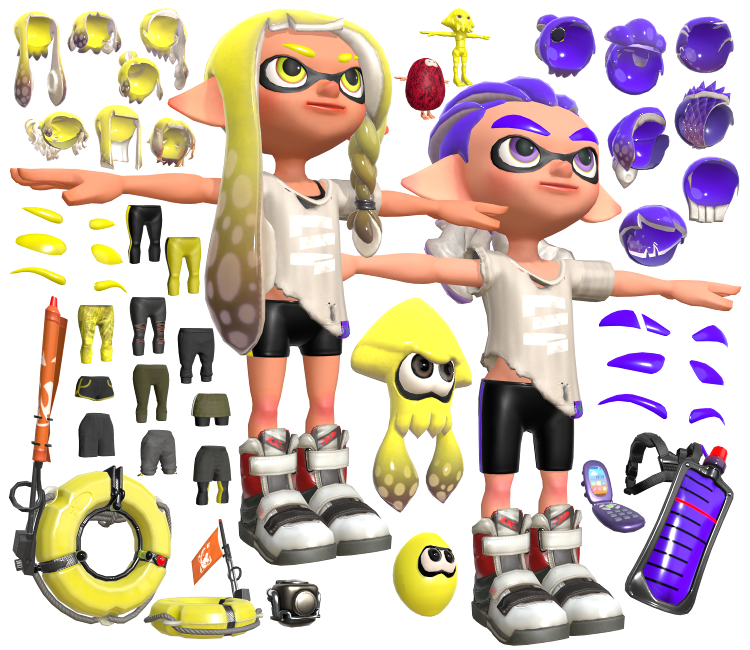
| Asset Info favorite | |
|---|---|
| Name | Inkling |
| Category | Nintendo Switch |
| Game | Splatoon 3 |
| Section | Playable Characters |
| Submitted | October 11, 2022 |
| Uploaded By | Centrixe the Dodo |
| Size |
40.70 MB (749 items) arrow_right
|
| Format |
ZIP (application/zip) dae, fbx, png |
| Hits | 69,112 |
| Tags (2): | |
Comments (95)
You must be logged in to post comments.

Longshot, but does anyone know how to make the teamcolor work in Maya?
Where are some of the leggings? I can't find the ripped ones, it seems to only up to 8 pairs?
I'm also having issues with the eyebrows warping on import?
I'm also having issues with the eyebrows warping on import?

@UnknownFox37 I haven't actually done it but a quick and easy way is to use Squidnodes https://github.com/PastaOwO/Squidnodes/wiki/How-to-use-Squidnodes

@Spletz47 and do you know how to apply them ?

They're flipping kewl. ;3

use the gear alpha mask textures.


im not sure why but the pants clip through the skin of the player model does anybody know how to fix this ?
Is there a GearAlphaMask for the ripped black leggings?

So, how do you make the fuzzball look like...the way it does in-game?
@LeoV4X I believe someone posted them on the Octolings' page
What are the hex codes of the in-game skin colors?
@Aurumantem your hair shader only works in eevee for me, and the eyelids only work in cycles-
I cant find the Alpha mask for the ripped pants as no alpha mask pants have holes in them, for now I will see if I can make my own
@UnknownFox37 2cl textures are the textures used for the ink effect on a player or other model. Like when you get hit with some ink and there's splotches on your clothes and player model. I think Squidnodes has a good explanation on how to use them
How do you change ink color?
what are 2cl textures and how do you use them ?
@WNN just like clothes
https://www.vg-resource.com/thread-40995.html
https://www.vg-resource.com/thread-40995.html
@zirconmonkey you must map the texture there is no other way unfortunately, i'm currently looking for a way to do it in real-time so i can animate them but i definitively am not good enough at Blender to do it on my own
https://drive.google.com/file/d/194vyJDjzRrl2HzjOGsfwPMsa9jiYfPFr/view?usp=share_link
then change the values at "location"
https://drive.google.com/file/d/194vyJDjzRrl2HzjOGsfwPMsa9jiYfPFr/view?usp=share_link
then change the values at "location"