Sonic the Hedgehog (Special Stage)
(Current scale is below 100% - zoom in to view full detail)
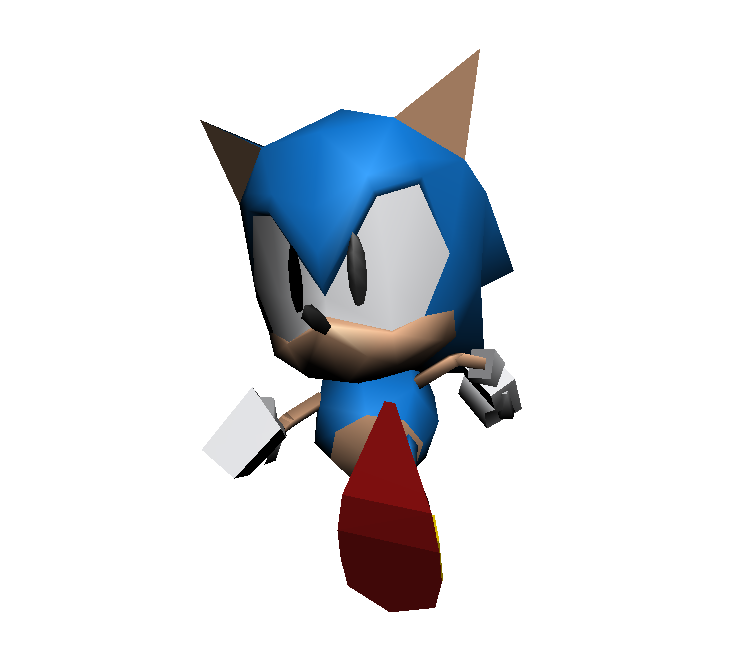
| Asset Info favorite | |
|---|---|
| Name | Sonic the Hedgehog (Special Stage) |
| Category | PC / Computer |
| Game | Sonic Mania |
| Section | Playable Characters |
| Submitted | June 6, 2018 |
| Uploaded By | Turtle Boy |
| Size |
1.28 MB (44 items) arrow_right
|
| Format |
ZIP (application/zip) dae, txt |
| Hits | 33,583 |
| Tags (3): | |
Comments (14)
You must be logged in to post comments.

When the eyes are higher quality than the Character itself! 😳

i feel like the preview image should be updated it looks low quality and the shadows are really low quality

Or download an older version of Blender that supports .DAE files. Either way will probably work.

just for anyone wondering why they can't open the dae files in blender 5.0:
they removed dae support, so you need to download a blender add-on from github.
they removed dae support, so you need to download a blender add-on from github.
@esponjaresource
Set the viewport thingy to Attribute. You can then see colors
Set the viewport thingy to Attribute. You can then see colors

couldn't you guys just put the textures onto the model?

ok
i imported the model in blender 4.0
sonic has no colors at all even setting to the color only option, texture option, and same for the shading mode
i imported the model in blender 4.0
sonic has no colors at all even setting to the color only option, texture option, and same for the shading mode

@Croissant That's because they add colors via a texture file
@SIG7Pro: Few months late reply, but you can easily convert each .dae file into .obj files using Blender.

why is this all in dae files, anyone know how to convert it to an obj?

He has no color at all

GOTTA GO FAST
ok tails and knuckles, now sonic.
i've been working on modding the saturn models into the game and i figured out a trick to "texture" the model for added detail if you want to mod your own character model in: just create precise cuts on the face you want to "texture" and color the cut-out face accordingly