Fuji


x
arrow_back download comment undo arrow_forward
(Current scale is below 100% - zoom in to view full detail)
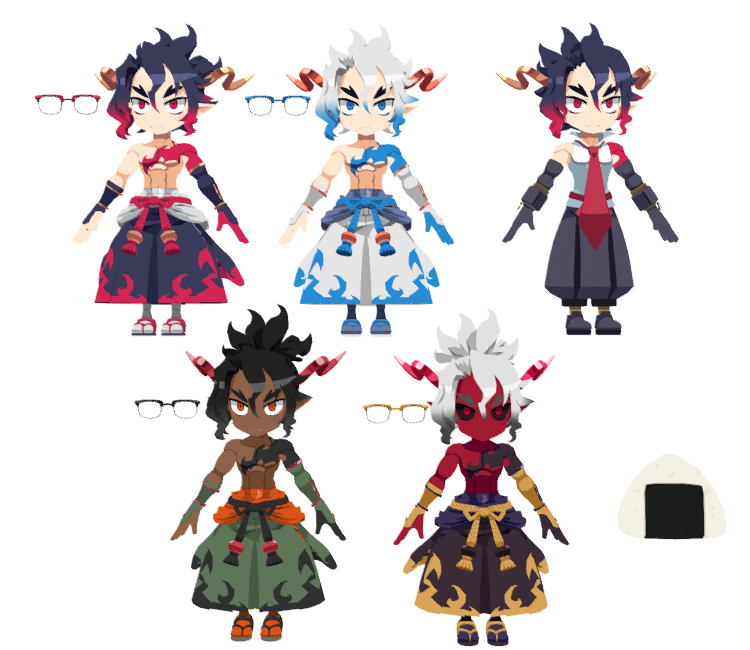
Asset Info favorite
Name Fuji
Category PC / Computer
Game Disgaea 7: Vows of the Virtueless
Section Characters
Submitted April 30, 2024
Uploaded By Grounder
Size 10.09 MB (28 files) arrow_right
  • rig_011101_fuji.dae
  • rig_011101_fuji.fbx
  • rig_013001_fujiglasses.dae
  • rig_013001_fujiglasses.fbx
  • rig_013201_fuji_cosplay.dae
  • rig_013201_fuji_cosplay.fbx
  • t_011101_fuji_base_d.png
  • t_011101_fuji_other_d.png
  • t_011101_fuji_p01.fbx
  • t_011101_fuji_p01.mtl
  • t_011101_fuji_p01.obj
  • t_011101_fuji_p01_d.png
  • t_011102_fuji_base_d.png
  • t_011102_fuji_other_d.png
  • t_011103_fuji_base_d.png
  • t_011103_fuji_other_d.png
  • t_011104_fuji_base_d.png
  • t_011104_fuji_other_d.png
  • t_013001_fujiglasses_base_d.png
  • t_013001_fujiglasses_other_d.png
  • t_013002_fujiglasses_base_d.png
  • t_013002_fujiglasses_other_d.png
  • t_013003_fujiglasses_base_d.png
  • t_013003_fujiglasses_other_d.png
  • t_013004_fujiglasses_base_d.png
  • t_013004_fujiglasses_other_d.png
  • t_013201_fuji_cosplay_base_d.png
  • t_013201_fuji_cosplay_other_d.png
Format ZIP (application/zip)
dae, fbx, mtl, obj, png
Hits 1,936
Tags (4):

Comments (5)


You must be logged in to post comments.
Avatar
personally, i go to the uv view and make sure only the eyebrow shapes are selected
Grounder Aug 21, 2026 7:20 PM
Avatar
how do I do that? I get taht i have to use edit mode in blender but I'm not sure where to pull out his eyebrows
Edibleback Aug 21, 2026 12:54 PM
Avatar
Ah gotcha, thanks grounder
Edibleback Aug 19, 2026 8:36 PM
Avatar
late reply. you have to manually move the vertices out from inside his head.
Grounder Aug 19, 2026 7:58 PM
Avatar
When I import him into blender he's missing his eyelashes, anybody know why?
Edibleback Aug 10, 2026 8:34 PM