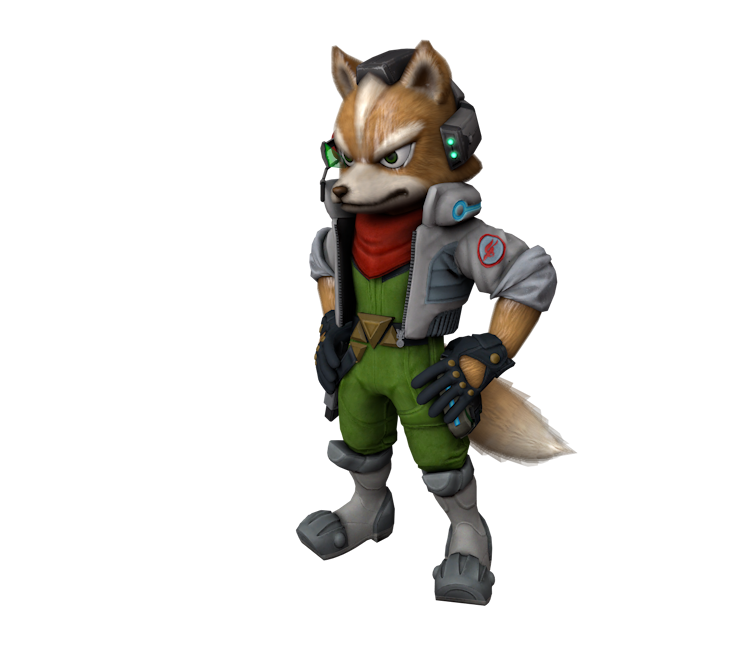
Fox McCloud
(Current scale is below 100% - zoom in to view full detail)
| Asset Info favorite | |
|---|---|
| Name | Fox McCloud |
| Category | Wii U |
| Game | Star Fox Zero |
| Section | Gallery |
| Submitted | December 5, 2020 |
| Uploaded By | Nooga |
| Contributors | akuago220 |
| Size |
9.83 MB (26 items) arrow_right
|
| Format |
ZIP (application/zip) dae, fbx, mtl, obj, png, smd |
| Hits | 15,885 |
| Tags (4): | |
Comments (9)
You must be logged in to post comments.

Reply to comment by The O'Donnell posted Apr 16, 2026 3:10 AM
I seriously did NOT expect to see him in the movie.
I'm happy he is in the Super Mario Galaxy Movie.

BulbXML: Try using something like Mixamo.

yo does anyone have a t-posed version of this model? any file type will work :)

@SpyrotheDragon2021 They are pre-posed gallery models with no skeletal rigs. They were never t-posed from the start.
If you know a user who can give these gallery models a proper rig, let me know. Until then, blame PlatinumGames.
If you know a user who can give these gallery models a proper rig, let me know. Until then, blame PlatinumGames.
Why this model is not in a T-pose ?

@TailsSena I've submitted a revision to fix these problems (same problem was happening to the other gallery models too) - hopefully it gets accepted soon.

TailsSena Thank you

So the .DAE for this spits out errors and fails to import in Blender. I fixed it on my end but it sure was an experience. A learning experience at least.
Anyway, the specific errors were that it was referencing diffuses that don't exist in the provided files. For examples, ple000006-fx. There are no -fx files among those in the .zip.
Aaaalso the .FBX just straight up crashed Blender without printing any errors to the console. I assume it's a similar problem.
The solution I had to resort to was going through the .DAE in Notepad++ and removing everything in the brackets since it was all invalid.
Anyway, the specific errors were that it was referencing diffuses that don't exist in the provided files. For examples, ple000006-fx. There are no -fx files among those in the .zip.
Aaaalso the .FBX just straight up crashed Blender without printing any errors to the console. I assume it's a similar problem.
The solution I had to resort to was going through the .DAE in Notepad++ and removing everything in the brackets since it was all invalid.
