Mii
(Current scale is below 100% - zoom in to view full detail)
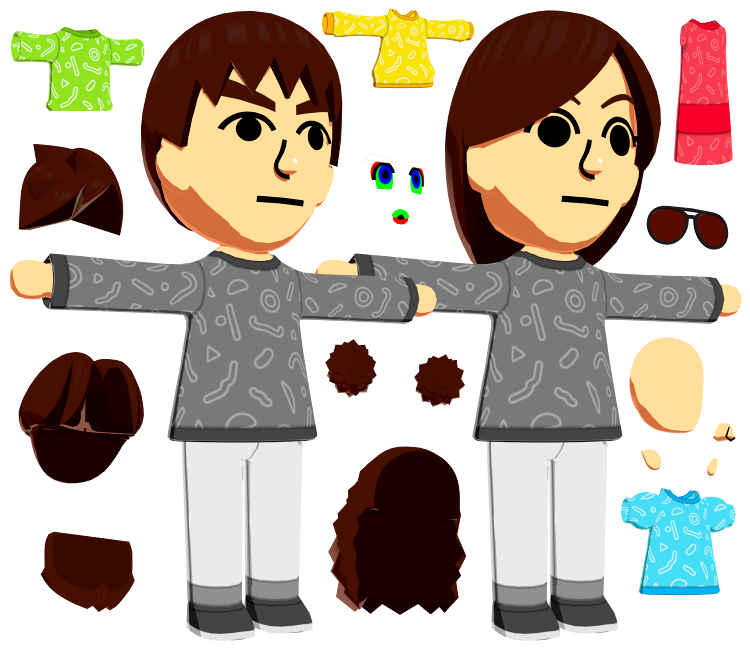
| Asset Info favorite | |
|---|---|
| Name | Mii |
| Category | Nintendo Switch |
| Game | Tomodachi Life: Living the Dream |
| Section | Playable Characters |
| Submitted | April 16, 2026 |
| Uploaded By | Centrixe the Dodo |
| Size |
125.67 MB (8,364 items) arrow_right
|
| Format |
ZIP (application/zip) dae, fbx, png |
| Hits | 13,888 |
| Tags (20): arrow_right | |
Comments (42)
You must be logged in to post comments.
a guide would be fantastic, i want to recreate my miis but i don't know enough about how to use the files given

Of course, I'm just not sure how to layer them onto the face mesh and move them without changing the meshes UVs. The Smash Trophy models have a single prebuilt face texture that lines up perfectly with this model's face mesh UVs, so you can build the face in Photoshop instead.

Just added a GLB preview; mainly for those who aren't familiar with applying constraints and whatnot. Now you can at least observe the 2 default Miis pre-built from here.


You know you can just use the face textures from here: https://www.spriters-resource.com/nintendo_switch/tomodachilifelivingthedream/asset/545090/
A guide on that would be fantastic!
For now, I'm just using edited versions of the textures from these models:
Mii Brawler / Gunner / Swordfighter Trophy
For now, I'm just using edited versions of the textures from these models:
Mii Brawler / Gunner / Swordfighter Trophy

How would one go by setting up the model? (I.e. skin color, heads, hair etc.) I feel like I'm missing something or some [blender] knowledge because I've just been messing around not knowing if I'm supposed to edit the texture for the skin color or not 'n other crap
Mii: "Wow, I finally have ears!
...and no longer have fingers..."
...and no longer have fingers..."
You can even customize their EARS
This calls for victory music.
Alexa, play the Mii Channel Parade theme!
Alexa, play the Mii Channel Parade theme!
And this is it. The greatest model on this website.

Now we wait for someone to make a tutorial on how to make a mii rig out of this (rly need pls someone)
Yep! You can use the download button after selecting a specific sprite to see its name, or just download the whole zip.
Is there an image guide or something so we can tell at a glance which piece is in which file? I can't tell how they're organized.

i mean the miis are playable in some of the minigames. the marriage proposal minigame is the most notable one that comes to mind.
CRDNFVOFN I CANT WAIT TO GET THIS AJDEJNJNVONVOENTO

Choose Your Gender style
"Playable Characters" in a Life Simulation game where you (the invisible person with a hand) is actualy controlling them

Insane work! Well done, Centrixe! 👏
| keyboard_double_arrow_left keyboard_arrow_left | Page 2 of 3 | keyboard_arrow_right keyboard_double_arrow_right |
https://x.com/BIOS_HZRD/status/2050796387613241743?s=20