Princess Peach
(Current scale is below 100% - zoom in to view full detail)
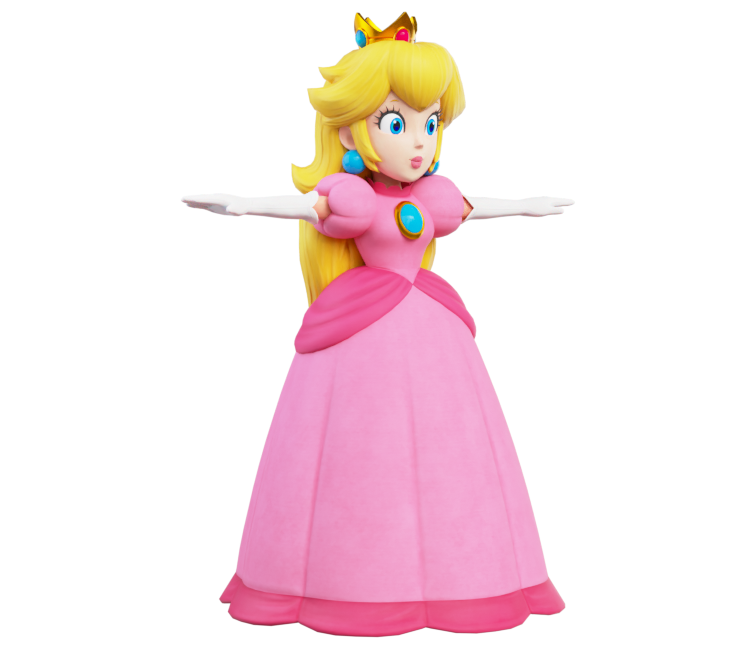
| Asset Info favorite | |
|---|---|
| Name | Princess Peach |
| Category | Nintendo Switch |
| Game | Luigi's Mansion 3 |
| Section | Non-Playable Characters |
| Submitted | May 28, 2021 |
| Uploaded By | imJJ |
| Size |
7.52 MB (21 items) arrow_right
|
| Format |
ZIP (application/zip) dae, png |
| Hits | 21,574 |
| Tags (2): | |
Comments (21)
You must be logged in to post comments.
This model is indeed better than the average peach model, but her dress bones, and weird proportions really screw this model over

@Goldy: I did actually use Blender! To achieve a similar result, I’m more than happy to give you my lighting setup through a PM.

@Dj_Fox11 You didn't use Blender to render this did you...? I clearly get a different result
Thanks DJ_Fox11!
@Goldy: I might send some revisions for the main models with some texture renaming. But for the time being, here's a list of Peach's texture names and what they are:
0x1c88875.png = Hair (Albedo)
0x2b3c702.png = Hair (Normal Map)
0x2fc2906.png = Hair Roughness)
0x18b67a7.png = Metal (Normal Map)
0x64cdade3.png = Dress (Albedo)
0x65b8ec70.png = Dress (Normal Map)
0x88a6f3b1.png = Face (Roughness)
0x262a3c83.png = Skin, Shoes, Gloves (Albedo)
0x275ddd14.png = Skin, Shoes, Gloves (Roughness)
0x885e91ad.png = Face (Normal Map)
0x6892e274.png = Eyes (Albedo)
0x27157b10.png = Skin, Shoes, Gloves (Normal Map)
0x66014e74.png = Dress (Roughness)
0x2703628f.png = Skin, Shoes, Gloves (Metallic)
0x87735320.png = Face (Albedo)
0xb66ad6d9.png = Face (Ambient Occlusion)?
0xbe65741a.png = Metal (Albedo)
0xbf3e9a26.png = Metal (Metallic)
0xbf9914ab.png = Metal (Roughness)
I hope this helps!
0x1c88875.png = Hair (Albedo)
0x2b3c702.png = Hair (Normal Map)
0x2fc2906.png = Hair Roughness)
0x18b67a7.png = Metal (Normal Map)
0x64cdade3.png = Dress (Albedo)
0x65b8ec70.png = Dress (Normal Map)
0x88a6f3b1.png = Face (Roughness)
0x262a3c83.png = Skin, Shoes, Gloves (Albedo)
0x275ddd14.png = Skin, Shoes, Gloves (Roughness)
0x885e91ad.png = Face (Normal Map)
0x6892e274.png = Eyes (Albedo)
0x27157b10.png = Skin, Shoes, Gloves (Normal Map)
0x66014e74.png = Dress (Roughness)
0x2703628f.png = Skin, Shoes, Gloves (Metallic)
0x87735320.png = Face (Albedo)
0xb66ad6d9.png = Face (Ambient Occlusion)?
0xbe65741a.png = Metal (Albedo)
0xbf3e9a26.png = Metal (Metallic)
0xbf9914ab.png = Metal (Roughness)
I hope this helps!
The problem is that I don't know which texture goes to Metallic for example... I think a renaming might help if you do know what they are
@DJ_Fox11: Oh, I see! Maybe I should try again sometime
@Goldy: No secrets here! The only thing I did with this icon was apply all the texture maps. Although lighting can play a vital role in how your model looks, it could be worthwhile to mess around with some lighting setups or HDRI’s.
Why can't I get this result when I render it... what's the secret here?
@Superstar Mario Trio: It's not missing, I'm pretty sure 0x18b67a7.png is its normal map. Those objects just don't need detail like the rest, so their normal map is a 16x16 normal map with no detail.
The meshes that are Peach's crown, earrings, and brooch are missing a normal map texture.
Hey JJ314, would you mind telling me the name of the model file for Princess Peach. As you would know, the models are called “model_63.lm3m” for example, and it’s impossible to tell what model is what.

Her model is similar to the Mario + Rabbids games.
I love this Peach model in particular so much for some reason.

oh wow, thats wild...and kinda gross lmao

It's right before the final boss https://youtu.be/lMl4taee5LM?t=239
What cutscene was that?? I don't remember her neck stretching in a cutscene, then again I haven't touched the game in well over a year...
Still thinking about the cutscene where her neck stretches.

Yeah, Nintendo outdid themselves on this one for sure.

The model looks good, though it also looks like clay
| keyboard_double_arrow_left keyboard_arrow_left | Page 1 of 2 | keyboard_arrow_right keyboard_double_arrow_right |