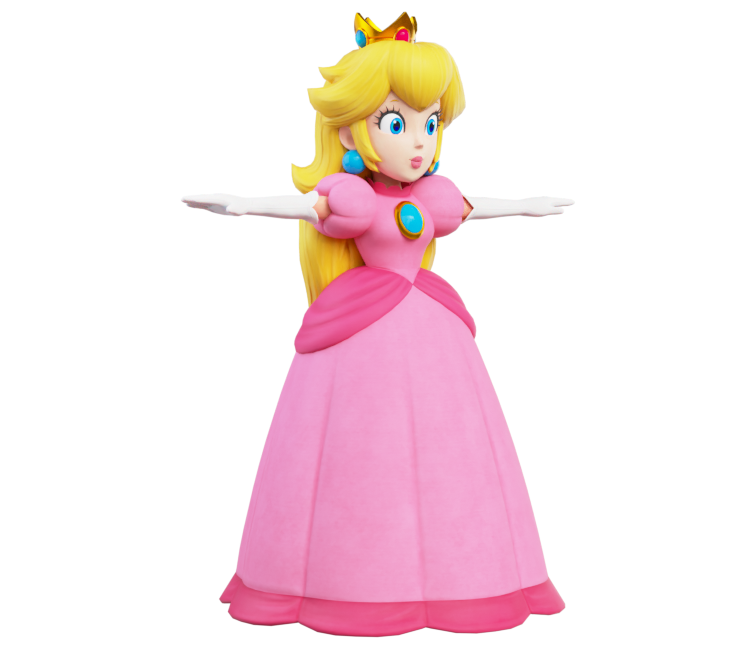
Princess Peach
(Current scale is below 100% - zoom in to view full detail)
| Asset Info favorite | |
|---|---|
| Name | Princess Peach |
| Category | Nintendo Switch |
| Game | Luigi's Mansion 3 |
| Section | Non-Playable Characters |
| Submitted | May 28, 2021 |
| Uploaded By | JJ314 |
| Size |
7.52 MB (21 items) arrow_right
|
| Format |
ZIP (application/zip) dae, png |
| Hits | 17,974 |
| Tags (4): | |
Comments (20)
You must be logged in to post comments.

@Goldy: I did actually use Blender! To achieve a similar result, I’m more than happy to give you my lighting setup through a PM.
djfox11  Apr 29, 2024 11:46 AM
Apr 29, 2024 11:46 AM
@Dj_Fox11 You didn't use Blender to render this did you...? I clearly get a different result
Thanks DJ_Fox11!
@Goldy: I might send some revisions for the main models with some texture renaming. But for the time being, here's a list of Peach's texture names and what they are:
0x1c88875.png = Hair (Albedo)
0x2b3c702.png = Hair (Normal Map)
0x2fc2906.png = Hair Roughness)
0x18b67a7.png = Metal (Normal Map)
0x64cdade3.png = Dress (Albedo)
0x65b8ec70.png = Dress (Normal Map)
0x88a6f3b1.png = Face (Roughness)
0x262a3c83.png = Skin, Shoes, Gloves (Albedo)
0x275ddd14.png = Skin, Shoes, Gloves (Roughness)
0x885e91ad.png = Face (Normal Map)
0x6892e274.png = Eyes (Albedo)
0x27157b10.png = Skin, Shoes, Gloves (Normal Map)
0x66014e74.png = Dress (Roughness)
0x2703628f.png = Skin, Shoes, Gloves (Metallic)
0x87735320.png = Face (Albedo)
0xb66ad6d9.png = Face (Ambient Occlusion)?
0xbe65741a.png = Metal (Albedo)
0xbf3e9a26.png = Metal (Metallic)
0xbf9914ab.png = Metal (Roughness)
I hope this helps!
0x1c88875.png = Hair (Albedo)
0x2b3c702.png = Hair (Normal Map)
0x2fc2906.png = Hair Roughness)
0x18b67a7.png = Metal (Normal Map)
0x64cdade3.png = Dress (Albedo)
0x65b8ec70.png = Dress (Normal Map)
0x88a6f3b1.png = Face (Roughness)
0x262a3c83.png = Skin, Shoes, Gloves (Albedo)
0x275ddd14.png = Skin, Shoes, Gloves (Roughness)
0x885e91ad.png = Face (Normal Map)
0x6892e274.png = Eyes (Albedo)
0x27157b10.png = Skin, Shoes, Gloves (Normal Map)
0x66014e74.png = Dress (Roughness)
0x2703628f.png = Skin, Shoes, Gloves (Metallic)
0x87735320.png = Face (Albedo)
0xb66ad6d9.png = Face (Ambient Occlusion)?
0xbe65741a.png = Metal (Albedo)
0xbf3e9a26.png = Metal (Metallic)
0xbf9914ab.png = Metal (Roughness)
I hope this helps!
The problem is that I don't know which texture goes to Metallic for example... I think a renaming might help if you do know what they are
@DJ_Fox11: Oh, I see! Maybe I should try again sometime
@Goldy: No secrets here! The only thing I did with this icon was apply all the texture maps. Although lighting can play a vital role in how your model looks, it could be worthwhile to mess around with some lighting setups or HDRI’s.
Why can't I get this result when I render it... what's the secret here?
@Superstar Mario Trio: It's not missing, I'm pretty sure 0x18b67a7.png is its normal map. Those objects just don't need detail like the rest, so their normal map is a 16x16 normal map with no detail.

The meshes that are Peach's crown, earrings, and brooch are missing a normal map texture.
Hey JJ314, would you mind telling me the name of the model file for Princess Peach. As you would know, the models are called “model_63.lm3m” for example, and it’s impossible to tell what model is what.

Her model is similar to the Mario + Rabbids games.
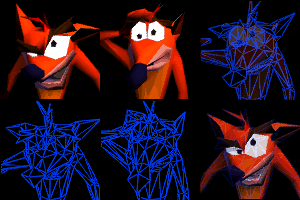
I love this Peach model in particular so much for some reason.

oh wow, thats wild...and kinda gross lmao

It's right before the final boss https://youtu.be/lMl4taee5LM?t=239
What cutscene was that?? I don't remember her neck stretching in a cutscene, then again I haven't touched the game in well over a year...
Still thinking about the cutscene where her neck stretches.

Yeah, Nintendo outdid themselves on this one for sure.
The model looks good, though it also looks like clay
Mario: "Where's the princess?"
Luigi: "Over there, on the Models Resource!"
Anyways, good to see Peach is finally here!
Luigi: "Over there, on the Models Resource!"
Anyways, good to see Peach is finally here!