Bob-omb Battlefield
(Current scale is below 100% - zoom in to view full detail)
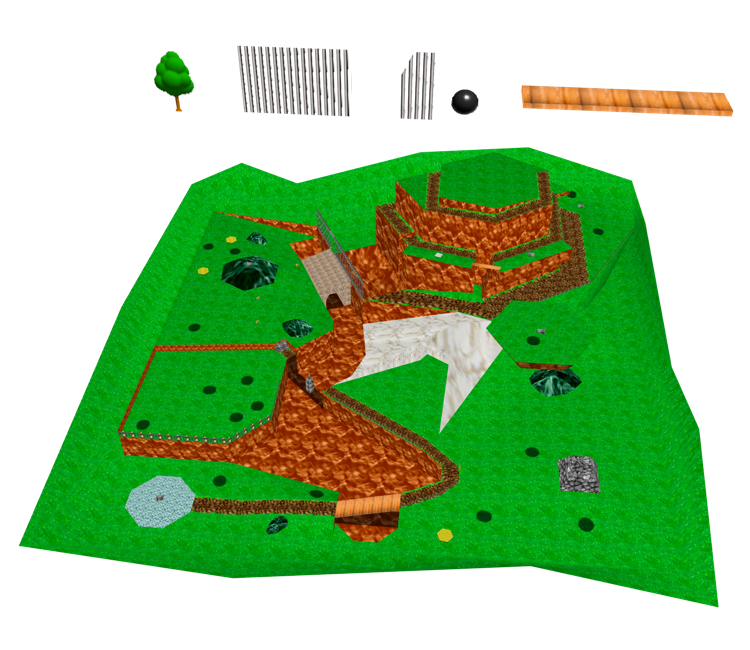
| Asset Info favorite | |
|---|---|
| Name | Bob-omb Battlefield |
| Category | Nintendo 64 |
| Game | Super Mario 64 |
| Section | Locations |
| Submitted | A long, long time ago |
| Uploaded By | alecpike |
| Contributors | Peardian |
| Size |
130.38 KB (36 items) arrow_right
|
| Format |
ZIP (application/zip) dae, png |
| Hits | 77,102 |
| Tags (2): | |
Comments (18)
You must be logged in to post comments.

I think 0x7C_Wooden_Signpost.008 is misplaced, its randomly in the air

All of the models here were recently updated and now use DAE instead of OBJ/MTL, so those are no longer included.

Where's the .mtl and .obj files? There just not in the download anymore! Am I going mad?
Sometimes I forget things are still be uploaded from SM64

There would be a river going through the middle of the stage, that's why there are bridges. Wonder why they took it out

When i put this in blender then unreal it just doesn't want me to enter

@blobbychizz Just flip the normals
Why is it that when I put this into unity, the entire thing is inside out, (example: I can see the inside of the floating island), I'm trying to fix this as a beginner at coding in unity.

♪ DING A LING DING DING DING DING DING DING DING DING ♪
I just rarely sung that theme song from Bob-omb Battlefield but couldn't stop singing
I just rarely sung that theme song from Bob-omb Battlefield but couldn't stop singing

bruh i was gonna import this to roblox studio and Guess what. its a single model. no surprise anyways
@megapato3: Any time! :)
@DogToon64 YO! I DID IT! Thanks for the help, cha! Really!
@megapato3: First, click on "File" at the top-left corner of the window, then go to "Import > Wavefront (.obj)", and it should be pretty straightforward from there. Hope this can help!
Does anyone know how to import a file like this (.mtl and .obj) in Blender? I really wanted to make a wallpaper, but need help!
how can you say this isn't art

@Cavan Ashton I don't use blender. I use different software, where some, not all models can be divided.
@Giant star nose mole If your using blender you can separate models by pressing p after you selected the mesh in edit mode. click separate then you should apply the textures on it.
Why I can put only one texture on whole model??!!