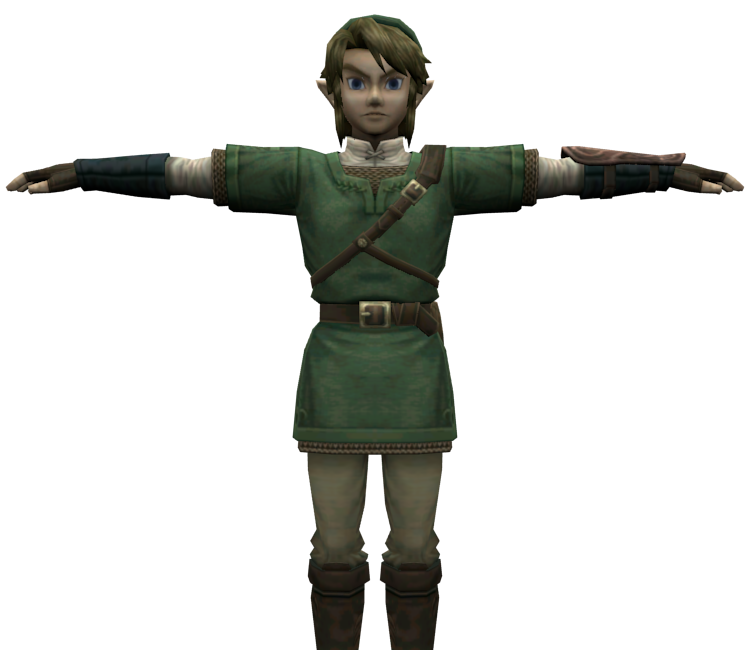
Link (Tunic)
(Current scale is below 100% - zoom in to view full detail)
| Asset Info favorite | |
|---|---|
| Name | Link (Tunic) |
| Category | GameCube |
| Game | The Legend of Zelda: Twilight Princess |
| Section | Playable Characters |
| Submitted | November 1, 2021 |
| Uploaded By | AJD-262 |
| Size |
357.62 KB (27 items) arrow_right
|
| Format |
ZIP (application/zip) dae, png, txt |
| Hits | 19,892 |
| Tags (1): | |
Comments (7)
You must be logged in to post comments.

Reply to comment by _NinjR_ posted Oct 23, 2025 11:51 PM
It's probably the eyelid texture that's causing the problem. Go to shading and plug the alpha of the al_eye.1 image in to the alpha of the principled bsdf. Then you can see the eyeball behind it
I ended up manually editing his eye socket texture and adding in the eyeball image to the blank space rather then trying to figure out how to load the transparency
Every Blender after 2.79 is cursed trash. Look at 3 video and 5 websites and nothing works and don't even have the same nodes as the shown half the time.
But yes Blender is not loading the transparency for the eye lids.
But yes Blender is not loading the transparency for the eye lids.
his eyes are just completely black, and i use blender 4.0
What do you mean by no eyes? Are they black or white? If yes the alpha isn't be loaded for the al_eye.1.png and how to fix this in 2.8 and above I have no idea. 2.8 and above can take its 9 million nodes and go to heck and die.
I'm having an issue with this model in Blender, for some reason he has no eyeballs but the texture is shown on the materials bar. How can i fix this?
the boy is here