Briefcase Woman
(Current scale is below 100% - zoom in to view full detail)
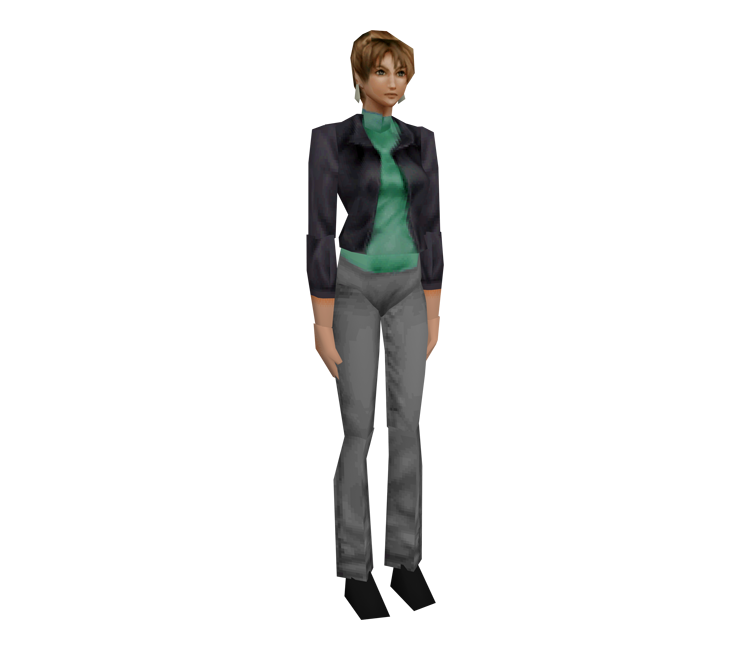
| Asset Info favorite | |
|---|---|
| Name | Briefcase Woman |
| Category | GameCube |
| Game | Resident Evil 3: Nemesis |
| Section | Non-Playable Characters |
| Submitted | September 5, 2025 |
| Uploaded By | Boxy |
| Size |
171.54 KB (6 items) arrow_right
|
| Format |
ZIP (application/zip) mtl, obj, png, txt |
| Hits | 2,429 |
| Tags (1): | |
Comments (7)
You must be logged in to post comments.
Reply to comment by Boxy posted Apr 22, 2026 11:52 PM
That'd be amazing, if it's not too much effort for you. My discord is my name.
No, I didn't use Blender. The obj files are directly from emdui. There are relative x, y, z offsets for each part in the lower-left corner, which is everything you need.
For some models, such as this one, or zombies, or zombie dog, those raw offsets already position everything correctly. For other models that have small triangle meshes representing joints, iirc the relative offsets are double-applied, once to the bone and also to the mesh. You just have to zero out the mesh offsets. For example try it with Jill's head mesh, and it should be back to the original position where it should be.
You can also compare the results with other tools like RE3MV or PSXPrev, for reference. Ideally the math would all be handled automatically, but it's easy to see what's happening and it's easy to fix.
There's also sometimes some tricky things going on with those small triangle mesh joints, but I'll leave it at that for now. If you need help I can maybe show an example in ripping help on discord.
For some models, such as this one, or zombies, or zombie dog, those raw offsets already position everything correctly. For other models that have small triangle meshes representing joints, iirc the relative offsets are double-applied, once to the bone and also to the mesh. You just have to zero out the mesh offsets. For example try it with Jill's head mesh, and it should be back to the original position where it should be.
You can also compare the results with other tools like RE3MV or PSXPrev, for reference. Ideally the math would all be handled automatically, but it's easy to see what's happening and it's easy to fix.
There's also sometimes some tricky things going on with those small triangle mesh joints, but I'll leave it at that for now. If you need help I can maybe show an example in ripping help on discord.
Thanks for the clarification. As ripping these models go, how did you get them in the correct rest position? I'm using emdui, and all the obj exports have "incorrect" positions. Did you stitch them back together manually in Blender?
They're unused in the GameCube version, as far as I know. I went back in-game to the boutique where you can change costumes, and there are only 5 choices. If there's a way to use those two costumes specifically in the GameCube version, I've never seen it.
The blue top outfit is in both the Dreamcast and PC versions, the black top outfit is only in the PC version, and the Dreamcast has a slightly different version of the black casual, apparently (blue top and blue skirt).
I don't really mind how they're categorized but as far as I know they're leftover files in the GameCube version which you can't access in-game.
https://tcrf.net/Resident_Evil_3:_Nemesis_(GameCube)
https://residentevil.fandom.com/wiki/Unlockable_costumes_in_Resident_Evil_3:_Nemesis
The blue top outfit is in both the Dreamcast and PC versions, the black top outfit is only in the PC version, and the Dreamcast has a slightly different version of the black casual, apparently (blue top and blue skirt).
I don't really mind how they're categorized but as far as I know they're leftover files in the GameCube version which you can't access in-game.
https://tcrf.net/Resident_Evil_3:_Nemesis_(GameCube)
https://residentevil.fandom.com/wiki/Unlockable_costumes_in_Resident_Evil_3:_Nemesis
No problem. Also, the other 2 Jill Costumes in Unused Content shouldn't be there either. They're the 2 Gamecube/PC/Dreamcast exclusive costumes. They should be in Playable Characters.
You're right. Thanks for catching that!
This shouldn't be under Unused Content. It's the model for the Assistant who gives you the briefcase upon successful completion of the Mercenaries mode.