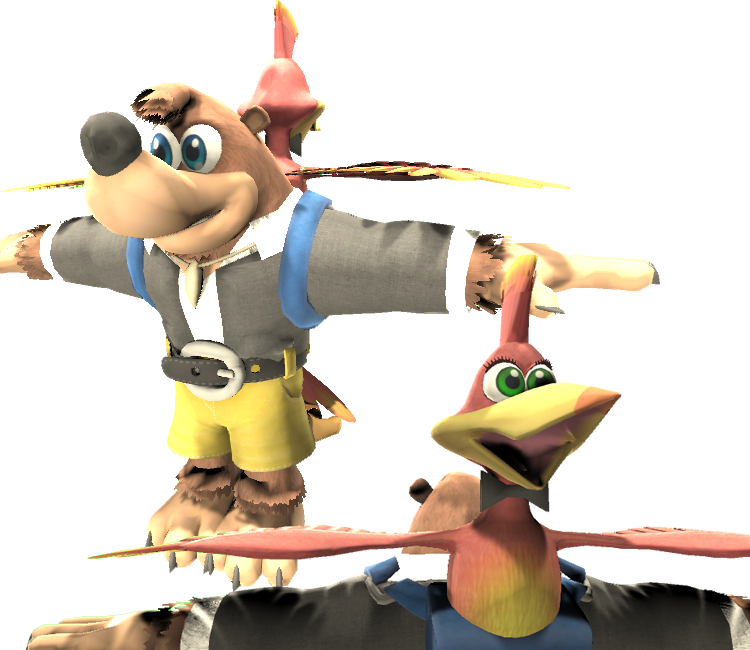
Banjo & Kazooie (Tuxedo)
(Current scale is below 100% - zoom in to view full detail)
| Asset Info favorite | |
|---|---|
| Name | Banjo & Kazooie (Tuxedo) |
| Category | Custom / Edited |
| Game | Banjo-Kazooie Customs |
| Section | Banjo & Kazooie |
| Submitted | October 3, 2019 |
| Uploaded By | Oakieland |
| Size |
13.84 MB (24 items) arrow_right
|
| Format |
ZIP (application/zip) dae, fbx, mtl, obj, png, txt |
| Hits | 18,058 |
Comments (22)
You must be logged in to post comments.

Reply to comment by A_MARIO!!! posted Dec 23, 2025 11:37 PM
Were you referring to the preview model there? No, that was just some invalid parameters causing parts of the preview model to be invisible, and has since been fixed.
Random Talking Bush  Dec 23, 2025 11:48 PM
Dec 23, 2025 11:48 PM
The normals of the chest are fliped
This would make a great SSBU mod
daaamn he drippin
@OakieLand you're the best!
Look up a tutorial on transparency shading for Blender. Either Eevee or Cycles.

Trying to mess around with the model in Blender and noticed this: https://imgur.com/0LxtRmR
Is there any way to get rid of all the white parts where it's supposed to be transparent?
Is there any way to get rid of all the white parts where it's supposed to be transparent?
Why?
1) I love Nuts & Bolts
2) I tried to upload the original model onto Smash page but mod team took 3+ weeks.
3) If it's a custom model I can bypass waiting.
4) Tuxedo is removable giving people the base BK model under it.
It's essentially a clever work around so people can have the model and an additional thing(tuxedo) with it.
That's why.
1) I love Nuts & Bolts
2) I tried to upload the original model onto Smash page but mod team took 3+ weeks.
3) If it's a custom model I can bypass waiting.
4) Tuxedo is removable giving people the base BK model under it.
It's essentially a clever work around so people can have the model and an additional thing(tuxedo) with it.
That's why.
Why?
You're welcome, I wanted the BK models to be public but I also wanted to make an alternate costume I wanted in Smash.
thank you for doing a custom removable tuxedo version of Banjo's smash ultimate model
For EEVEE, you have to change the blend mode to Alpha Clip or Alpha Hashed to have transparency work on textures. Just go to the Shader and search for the option, it's not hard to find.

I think I found a good solution for now.
I don't know much about Eevee sadly. I do all my work in 2.7. It works for in Blender Render and Cycles.
Eevee, Blender 2.8
Are you doing this in Blender render, cycles or eevee?
It's still the same issue when I do that
It’s because the transparent overlap is on top of another material. If you go in Render mode it should disappear.
well that causes this problem. https://imgur.com/a/9cOdqdu
@GregoryTheGamer the material applied to the black parts is supposed to have transparency. There should've been a separate material for those parts. Since it looks like you're using nodes, I'd look up a tutorial for transparent textures for Blender.
| keyboard_double_arrow_left keyboard_arrow_left | Page 1 of 2 | keyboard_arrow_right keyboard_double_arrow_right |